
LLM gateway and MCP gateway: two gates enterprise AI can’t do without
Every production AI application has two critical flows. Towards the models flow prompts and tokens — and with them money. Towards the tools flow actions — and with them access to your data and systems. Both flows start innocently (one API key, one configuration file) and both degenerate as you grow into a chaos of keys, costs and security holes. The solution in both cases is the same as it once was with microservices: put a gateway in the path. An LLM gateway unifies model providers, watches budgets and survives an outage; an MCP gateway keeps tools, secrets and audit under control. In this article we examine both in depth — what exactly they do, what a request’s journey looks like, what solutions are available and how to put them together.

The shortest distinction
An LLM gateway guards the path to models: cost, fallbacks and a unified API. An MCP gateway guards the path to tools: permissions, secrets and an audit of actions. Each gateway addresses a different risk and in production they complement each other well.
Anatomy of an AI application: brain and hands
Before we get to the gateways, let’s clarify what they actually guard. An agentic application is in essence a loop in which a language model thinks and calls tools. From an infrastructure perspective, two kinds of outbound connections lead out of it:
- Model calls (the brain). HTTP requests to inference APIs — OpenAI, Anthropic, Google, or your own vLLM cluster. You pay per token, latency is measured in seconds, and providers have outages, rate limits and a roughly six-month model lifecycle.
- Tool calls (the hands). Actions in your systems: reading a database, creating tickets, commits to repositories. You don’t pay tokens for them, but they have side effects — and therefore a completely different category of risk: what exactly is the agent allowed to do, and what credentials does it use?
Two flows, two distinct problems — and therefore two different gateways. Let’s start with the brain.
Problem one: model calls sprawl
The first version of every AI application calls one provider directly: OPENAI_API_KEY in an environment variable and off you go. The trouble comes gradually and in a familiar rhythm:
- A second provider. You want to try Claude on tasks where it’s better, or a cheap open-source model for classification. But every provider has a different API (Chat Completions vs. Messages), a different SDK, handles streaming, function calling and error codes differently.
if provider == ...branches start proliferating in the code. - Keys and spending without control. Every team creates its own account, keys circulate in
.envfiles and nobody can answer the question “how much does AI feature X cost us per month?”. One invoice arrives, for everything together. - Reliability. Provider outages are a reality, as is HTTP 429 at peak times. Without failover to another deployment or another provider, your application goes down with someone else’s infrastructure.
- Model churn. Models go stale faster than libraries — providers release new versions every few months and switch off old ones. When the model name is hard-wired in twenty places in the code, every swap is a small project.
LLM gateway: one API over all models
An LLM gateway (sometimes AI gateway) is a proxy through which all model calls pass. Your application talks to a single endpoint with a unified API — practically always in the OpenAI Chat Completions format, which has become the lingua franca — and the gateway translates the request and delivers it to the right provider. Around that it adds the layers the whole exercise is done for:
- Model aliases and routing. The application asks for
chytry-model(smart model) orlevny-model(cheap model); which specific model and provider the alias maps to is gateway configuration. Swapping a model = changing one YAML, no application redeploy. Routing can be smarter too: load distribution across multiple deployments, routing by latency or price. - Fallbacks and retries. When the primary model returns 429 or 5xx, the gateway transparently tries the next one in line — another region, another provider, or a cheaper model as a degraded mode. The application learns nothing, it gets an answer.
- Virtual keys and budgets. Only the gateway knows the real provider keys. Teams and applications get virtual keys with their own budget (e.g. USD 200 per month), rate limit (requests and tokens per minute) and a list of allowed models. An exhausted budget = HTTP 429, not a surprise on the invoice.
- Cache. Exact (same prompt → same answer from cache) and semantic — a cache hit even for similarly phrased queries via embedding similarity. On repetitive tasks (FAQ, classification, moderation) operators report savings of 20–40% of costs.
- Cost observability. Every request logged with price, tokens, latency and virtual key — so for the first time you can answer how much a specific feature, team or customer costs. Export to Prometheus/OpenTelemetry, alerting on anomalies.
- Guardrails. A central place for masking PII in prompts, detecting jailbreaks and filtering content — the policy is enforced for all applications equally, not according to who remembered it.
The price for all this? One extra network hop. Decent gateways add single-digit to low double-digit milliseconds — against the seconds the inference itself takes, that’s a rounding error.

LLM gateway in practice: LiteLLM
The most widespread open-source choice is LiteLLM — a Python proxy you run on your own infrastructure (typically with PostgreSQL for tracking spend and Redis for cache). The core of the configuration is the mapping of aliases to specific models:
# config.yaml -- dva aliasy, tri modely, fallback a cache
model_list:
  - model_name: chytry-model
    litellm_params:
      model: openai/gpt-4.1
      api_key: os.environ/OPENAI_API_KEY
  - model_name: chytry-model            # stejny alias podruhe = load balancing
    litellm_params:
      model: anthropic/claude-sonnet-4-5
      api_key: os.environ/ANTHROPIC_API_KEY
  - model_name: levny-model
    litellm_params:
      model: hosted_vllm/llama-3.3-70b
      api_base: http://vllm.interni.firma.cz/v1

litellm_settings:
  cache: true
  fallbacks:
    - chytry-model: ["levny-model"]     # kdyz oba chytre selzou, degraduj

router_settings:
  routing_strategy: latency-based-routing
Teams are then given not OpenAI keys but virtual keys with a budget and allowed models:
$ curl -X POST http://litellm.firma.cz:4000/key/generate \
    -H "Authorization: Bearer $LITELLM_MASTER_KEY" \
    -d '{
      "team_id": "podpora",
      "models": ["chytry-model", "levny-model"],
      "max_budget": 200,
      "budget_duration": "30d",
      "rpm_limit": 100
    }'
And because the gateway speaks the OpenAI format, applications need no new library — just a different base_url:
from openai import OpenAI

client = OpenAI(
    base_url="http://litellm.firma.cz:4000",
    api_key="sk-virtualni-klic-tymu-podpora",
)

odpoved = client.chat.completions.create(
    model="chytry-model",   # alias -- co je za nim, resi gateway
    messages=[{"role": "user", "content": "Shrn otevrene tickety za dnesek."}],
)
Notice what just happened to migrations: the next time a provider announces a model’s end of life, you change one line in config.yaml — and all the applications in the company keep running.
Who’s who among LLM gateways
| Solution | Character | Strength |
|---|---|---|
| LiteLLM | open source (MIT), self-hosted | Virtual keys with budgets, 100+ providers, zero markup, Prometheus metrics; the most widespread choice for running it yourself. |
| Portkey | open source core + managed service | The richest production feature set: 50+ guardrails (PII, jailbreak), semantic cache, prompt versioning, SOC2/HIPAA compliance. |
| OpenRouter | hosted marketplace | Hundreds of models on a single key and automatic fallbacks without any infrastructure; paid for by a ~5.5% markup when buying credits. |
| Cloudflare AI Gateway | hosted edge service | Cache and analytics at the edge in front of any provider, generous free tier; observability rather basic. |
| Kong AI Gateway / Envoy AI Gateway | AI extensions of classic API gateways | For teams already running Kong or Envoy — AI traffic is governed by the same infrastructure and policies as the rest of the APIs. |
A practical guide: for a quick prototype without infrastructure, OpenRouter; for enterprise operation with full control over data, self-hosted LiteLLM (or Portkey if you need compliance and guardrails out of the box); and if you already run an API gateway, consider its AI extension before adding another component.
That brings the brain under control. But agentic applications also have hands — and completely different traffic flows there.
Problem two: tools
In the article on AI agents we covered tool calling: the model receives JSON schemas of the available tools in the prompt and, instead of a text answer, can return the request “call tool X with arguments Y”. The application runs the tool, returns the result to the conversation and the loop continues. It works great — but notice everything that is left to the application’s author: writing the implementation of each tool, managing its dependencies and access keys, and all of that again for every application and every model provider.
The result was a single-use ecosystem: a Jira connector written for an internal chatbot couldn’t be used in the IDE, the IDE connector couldn’t be used in a CLI agent. It is exactly this fragmentation that MCP solves.
What the Model Context Protocol is
MCP is an open protocol published by Anthropic in November 2024; during 2025 it was adopted by OpenAI, Google, Microsoft and practically all agent frameworks, making it the de facto standard. It is often described as “USB-C for AI”: it defines a single socket into which any tool can be plugged, and a single plug that every AI client can use.
The architecture has three roles:
- Host — the application with the LLM (Claude Desktop, IDE, your own agent).
- MCP client — a component of the host that holds a 1:1 connection with one server.
- MCP server — a program exposing capabilities: tools (functions the model may call), resources (data to read — files, records) and prompts (ready-to-use templates).
Communication is via JSON-RPC 2.0, either over the stdio transport (the server runs as a local process, typical for development) or over streamable HTTP (a remote server, typical for production). When the server starts, the client asks what it can do (tools/list) and passes the tool schemas to the model — from that moment the model can call them (tools/call) without the application knowing anything about the tools in advance.
Writing an MCP server is a matter of a few lines — in Python the official SDK and its FastMCP class take care of all the protocol boilerplate:
from mcp.server.fastmcp import FastMCP

mcp = FastMCP("firemni-nastroje")

@mcp.tool()
def stav_objednavky(cislo: str) -> str:
    """Vrati aktualni stav objednavky podle jejiho cisla."""
    objednavka = crm.najdi_objednavku(cislo)
    return f"Objednavka {cislo}: {objednavka.stav}, doruceni {objednavka.termin}"

@mcp.tool()
def zaloz_ticket(nazev: str, popis: str, priorita: str = "stredni") -> str:
    """Zalozi novy ticket v service desku a vrati jeho ID."""
    ticket = servicedesk.vytvor(nazev, popis, priorita)
    return f"Zalozen ticket {ticket.id}"

if __name__ == "__main__":
    mcp.run()   # stdio transport
And a client (say, an IDE) connects to it declaratively, via configuration:
{
  "mcpServers": {
    "firemni-nastroje": {
      "command": "python",
      "args": ["firemni_nastroje.py"],
      "env": { "CRM_API_KEY": "sk-live-..." }
    }
  }
}
Elegant. But exactly this configuration already contains the seed of future problems — can you see it? A production API key sits in plaintext in a configuration file on a developer’s laptop.
What goes wrong when you deploy MCP naively
As long as it’s one developer and two servers, everything is fine. In a company with dozens of people, several AI clients (IDE, chatbot, CI agents) and a growing catalogue of internal and public servers, four categories of problems appear:
- Combinatorial explosion of configuration. Every client × every server × every machine = manually maintained JSON files everywhere. Updating a server or rotating a key means visiting all installations.
- Unmanaged secrets. API keys in configuration files and environment variables, often with full permissions, no expiry and no overview of who actually has them.
- Zero visibility. Which agent called which tool with what arguments? Without a central point there is no audit log — and the compliance department has bad dreams.
- A new attack surface. An MCP server is third-party code that you run with your credentials. There is the threat of tool poisoning (the tool description contains hidden instructions for the model), rug pull (the server changes behaviour after an update) and above all prompt injection: an attacker inserts instructions into data the agent legitimately reads — say, a GitHub issue — and the agent then executes them with its user’s permissions. This is exactly how the well-known GitHub MCP data heist worked: an injected issue in a public repository made the agent exfiltrate data from private repositories the same token had access to.
Note the fundamental difference from model calls: with the brain it was mainly about money and reliability, here it is about permissions and side effects. That is why an MCP gateway looks different from an LLM gateway — it is less concerned with the price of a token and more with who may run what.
MCP gateway: one gate instead of N×M wires
An MCP gateway is a server that stands between all clients and all MCP servers. Externally it looks like one big MCP server (clients are configured once, against one address); internally it works as a reverse proxy with a registry: it knows which servers exist, who may access them, starts them, forwards requests to them and records everything.
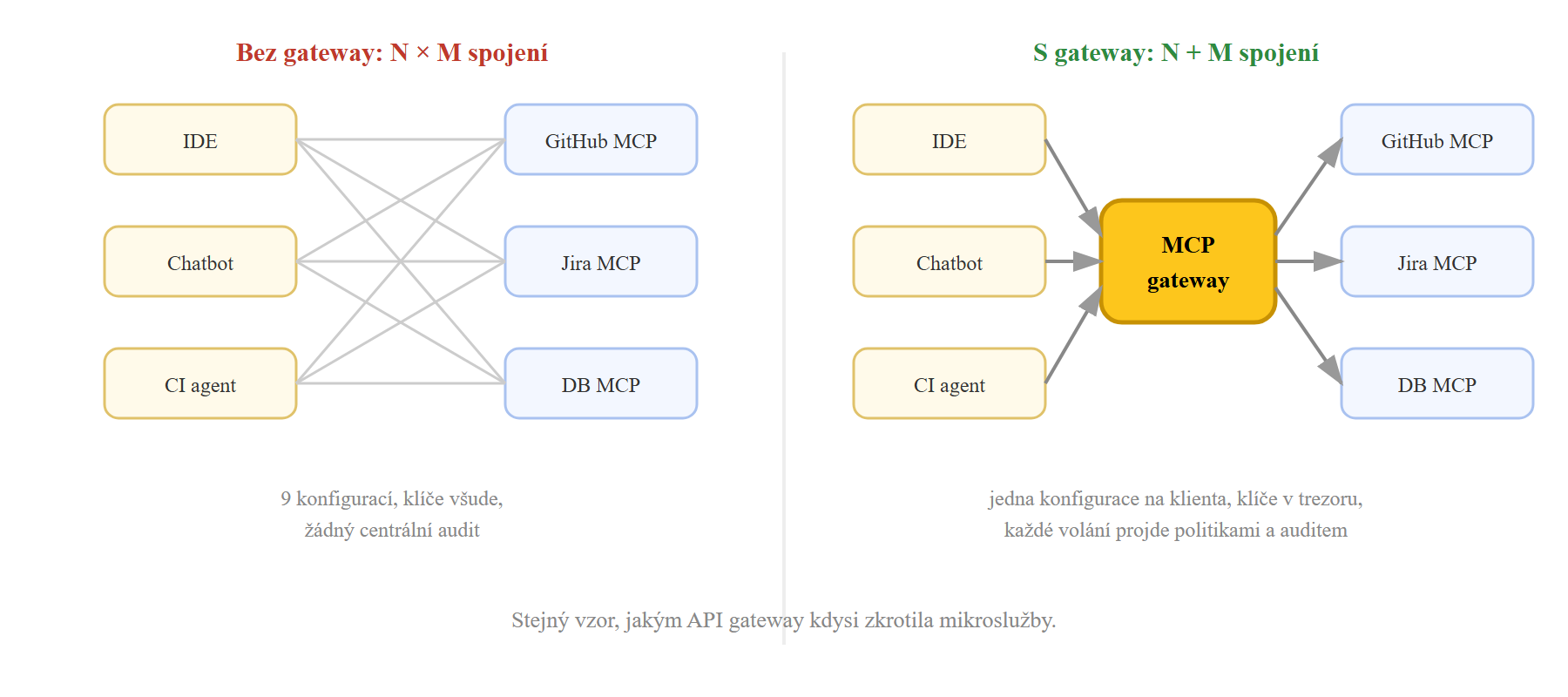
What specifically the gateway adds:
- Registry and catalogue — a list of approved servers including versions and provenance. A developer “orders” a tool from the catalogue instead of installing a random package from the internet.
- Authentication and authorisation — clients authenticate to the gateway (OAuth, JWT), the gateway authenticates to the servers. RBAC determines which team sees which tools; profiles narrow the tool set to what a given agent actually needs.
- Secrets management — API keys live in the gateway’s vault and are injected into servers only at runtime. They disappear from developers’ laptops.
- Guardrails and interceptors — programmable hooks before and after every tool call: argument validation, blocking of suspicious patterns, PII masking in responses.
- Audit and observability — every call logged with identity, arguments and result; metrics and tracing (OpenTelemetry) for debugging and compliance alike.
- Isolation and lifecycle — the gateway starts servers (typically in containers with trimmed privileges), restarts, scales and shuts them down.

Who’s who among MCP gateways
| Solution | Character | Strength |
|---|---|---|
| Docker MCP Gateway | open source, part of Docker Desktop and a standalone CLI | Container isolation of servers, a catalogue of 300+ verified images (signatures, SBOM), interceptors, secrets from Docker Desktop. |
| IBM ContextForge | open source registry + proxy | Federation of multiple gateways, RBAC and teams, conversion of REST/gRPC APIs into MCP tools, admin UI, OpenTelemetry. |
| Lasso mcp-gateway | open source, security-first | Traffic inspection: prompt injection detection, PII masking in both directions, argument validation. |
In practice: an MCP gateway in five minutes
The fastest start is offered by Docker MCP Gateway. You pick servers from the catalogue, the gateway starts them as isolated containers on the first call and exposes a single endpoint to clients:
# povol vybrane servery z katalogu
$ docker mcp server enable github-official duckduckgo

# API klice do trezoru, ne do configu
$ docker mcp secret set github.personal_access_token=ghp_...

# spust gateway pro vice klientu pres HTTP
$ docker mcp gateway run --transport streaming --port 8080
All clients (IDE, Claude Desktop, your own agent) are then configured the same way — with one entry instead of N:
{
  "mcpServers": {
    "brana": { "url": "http://localhost:8080/mcp" }
  }
}
And here we return to the GitHub data heist. With a gateway, the defence against it is a one-line policy: an interceptor that checks before every call that the agent isn’t reaching outside the allowed repository:
# interceptor "before": shell skript dostane JSON volani na stdin;
# kdyz argumenty miri do jineho nez povoleneho repozitare, volani zablokuje
$ docker mcp gateway run --transport streaming --port 8080 \
    --interceptor "before:exec:/policies/cross-repo-blocker.sh" \
    --interceptor "after:exec:/policies/audit-logger.sh"
The enterprise scenario (hundreds of users, teams, RBAC) is then covered by ContextForge — it runs as a regular web service, in production typically on Kubernetes:
$ docker run -d --name mcpgateway -p 4444:4444 \
    -e AUTH_REQUIRED=true \
    -e JWT_SECRET_KEY=dlouhy-nahodny-retezec \
    -e PLATFORM_ADMIN_EMAIL=admin@firma.cz \
    -e PLATFORM_ADMIN_PASSWORD=zmen-me \
    ghcr.io/ibm/mcp-context-forge:latest
A side bonus: fewer tools in the context
An MCP gateway doesn’t just help security. Every tool you offer the agent takes up space in the context window (schema + description easily hundreds of tokens) — and with dozens of servers the agent easily reaches thousands of tokens just in definitions of tools it will never use. Moreover, models choose worse as the number of tools grows; it is analogous to the problems we know from the article on the U-curve. Profiles on the gateway solve this systematically: each agent gets only the slice of the catalogue relevant to its work, or the gateway offers dynamic tool discovery (the agent looks up a tool only when it needs it) — instead of all 200 definitions hanging in every prompt.
Brain and hands together: a reference architecture
What does it all look like together? The agentic application stands in the middle and both gateways are its only outbound paths: prompts go left through the LLM gateway to the models, tool calls go right through the MCP gateway to the systems. The application itself knows not a single real API key.
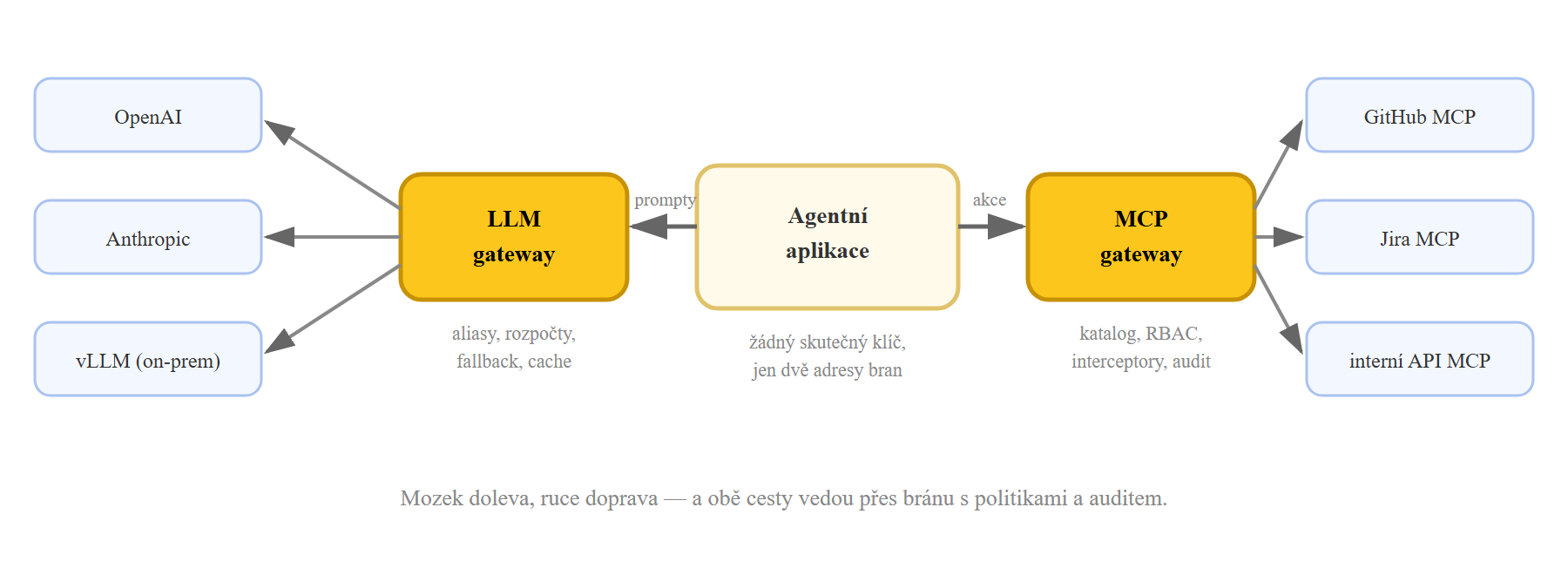
In summary, because the two terms get confused even in vendors’ marketing:
| LLM gateway | MCP gateway | |
|---|---|---|
| Sits between | the application and model providers | the agent and tools (MCP servers) |
| Main concern | costs, reliability, unified API | permissions, secrets, side effects |
| Typical features | aliases, fallbacks, virtual keys, budgets, cache | catalogue, RBAC, interceptors, isolation, audit |
| Worst case without it | blown budget, service outage | data leak, abused permissions |
| Representatives | LiteLLM, Portkey, OpenRouter | Docker MCP Gateway, ContextForge, Lasso |
And so that it isn’t too tidy: the two categories are converging. Besides models, LiteLLM can also broker MCP servers, Portkey offers an MCP gateway as a separate product, and ContextForge in turn routes agents towards models via the A2A protocol. A smaller company can thus start with one gateway for both — what matters is that both flows pass through some gateway, not how many containers run for it.
What to do about it in practice
For model calls
- Aliases from day one: no hard-coded model name in the code. Swapping a model should be a configuration change, not a release.
- Virtual keys with budgets for every team and application; only the gateway knows the real provider keys. Set the budget before the first blown invoice arrives.
- Test the fallback to another provider before you need it — including that your code survives minor differences in model behaviour.
- Turn on the cache and measure the hit rate: for repetitive tasks it is the cheapest optimisation you have available.
- Track cost per feature, not just total spend — only the breakdown by virtual keys shows which feature pays for itself.
For tools and MCP
- Deploy the gateway before you need it. Migrating ten developers from manual configurations is easy; migrating a hundred with sprawling keys is a quarter-long project.
- Least privilege: restrict tokens for MCP servers to read-only where writing isn’t necessary, and to specific repositories/projects. You won’t stop prompt injection in the model — you stop it by giving a stolen permission nowhere to reach.
- Profiles by role: a support agent doesn’t need deployment tools. Fewer tools = a smaller attack surface and better tool selection by the model.
- Catalogue only from verified sources — signed images, versioning, no
npxof a random package from a README. With unverified servers not even a gateway helps. - Log and read the logs: an audit trail is useless when nobody looks at it. At least alerting on anomalies (unusual tools, volumes, target domains).
- Expose internal APIs through the gateway (REST→MCP conversion in ContextForge) instead of writing your own MCP server for every service.
Building agents with tools?
In the AI Agent Developer course you try out tool calling, MCP and defence against prompt injection in practice. We also cover MCP and AI tools in the developer workflow in the Vibe Coding and AI in Development course. And if you missed the previous parts, start with the article on AI agents.
Sources and further reading
- LiteLLM — documentation of the open-source LLM gateway (proxy, virtual keys, routing)
- Portkey AI Gateway and OpenRouter — other LLM gateway representatives
- LLM Gateway 2026: OpenRouter vs LiteLLM vs Portkey vs Helicone — a detailed comparison with numbers
- Model Context Protocol — official specification and documentation
- Docker MCP Gateway and docker/mcp-gateway — documentation and source code
- MCP Horror Stories: The GitHub Prompt Injection Data Heist — analysis of the attack and defence with interceptors
- IBM ContextForge — open-source MCP registry and gateway
- Lasso Security mcp-gateway — security-first gateway with prompt injection detection
- Top MCP Gateways: Architecture-First Guide — comparison of solutions (2026)
