
What a vector database is and how AI agents use it
A classic database finds the row that exactly matches the query. But AI applications need something else: to find documents that are semantically similar to the query — even if they don’t share a single word. That is exactly what a vector database can do. In this article we explain what embeddings are and why meaning can be measured by distance, how the HNSW index that makes it all fast works, how Qdrant, pgvector and Pinecone differ — and above all: how vector databases serve AI agents as a knowledge base and long-term memory.
The shortest mental model
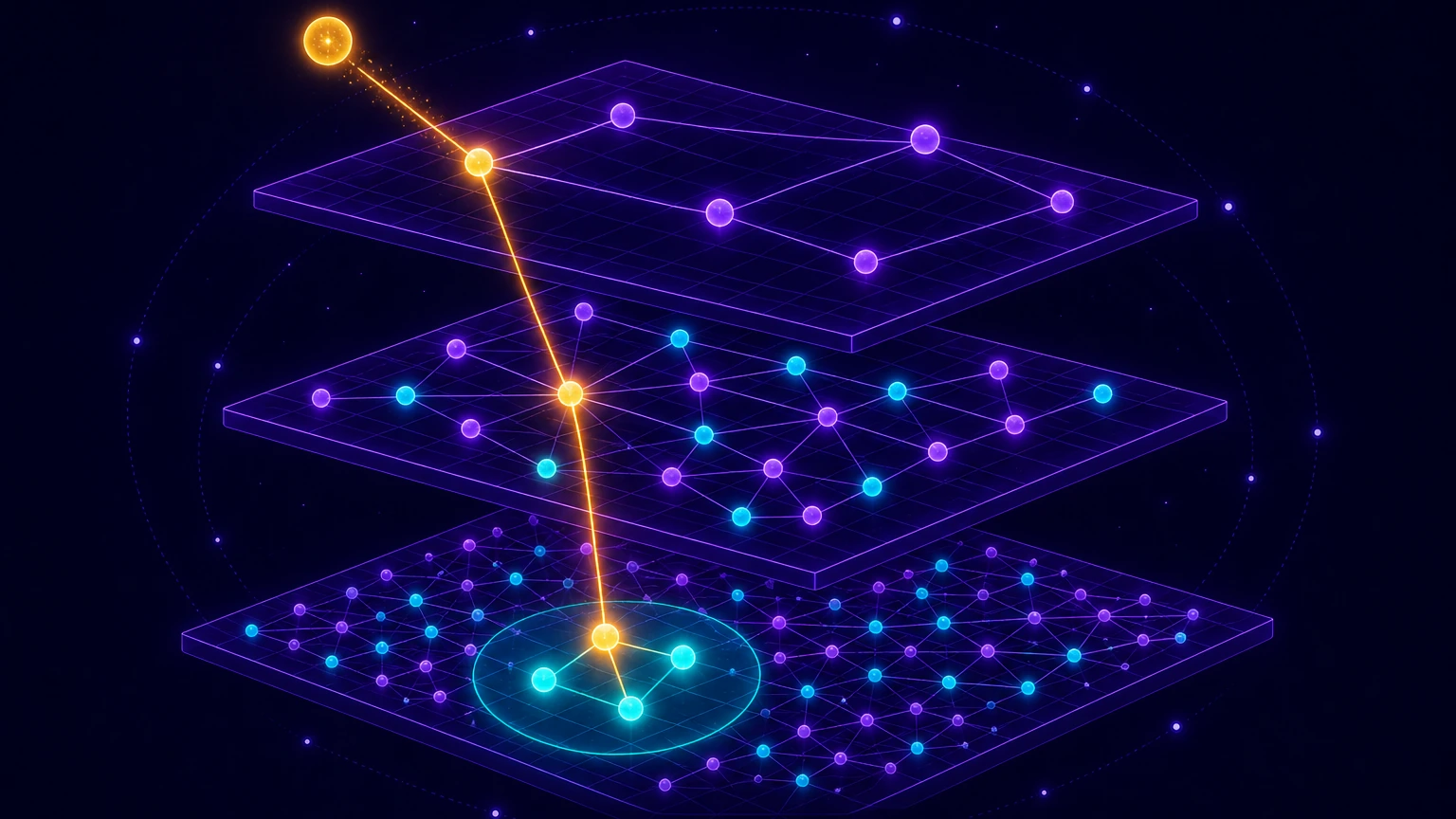
An embedding converts text into a point in space. A vector database then compares not words but distances between points — and thanks to an index like HNSW it does so quickly even over millions of documents.
Why classic search isn’t enough
Imagine a company wiki and the query “how long does holiday approval take”. But the relevant document is called “Leave policy: deadlines for the manager’s response” — it shares practically no word with the query. Full-text search (SQL LIKE, but also the smarter BM25) relies on word matches, so it won’t find this document. Synonyms, paraphrases, typos or a query in another language are invisible to it.
Semantic search bypasses words entirely: it compares meanings. And for meaning to be comparable by machine, we need to convert it into numbers. That conversion is called an embedding.
Embeddings: text as a point in space
An embedding model is a neural network that takes text (a word, a sentence, a paragraph, even an image) and returns a vector — a list of hundreds to thousands of numbers. For example text-embedding-3-small from OpenAI returns 1536 numbers, open-source models like bge-m3 or nomic-embed-text typically 768–1024. That vector is the coordinate of a point in a high-dimensional space, and a single but fundamental rule holds in it: texts with similar meaning lie close to each other.
The model learned this by training on a huge number of pairs of related texts (question–answer, headline–article, sentence–paraphrase): it pulled the vectors of related pairs closer together and pushed random ones apart. The resulting space therefore captures semantics — “holiday” lies close to “leave”, although as strings they have nothing in common.

The similarity of two vectors is most often measured by cosine similarity — the cosine of the angle between them. A value of 1 means the same direction (same meaning), 0 perpendicularity (unrelated texts). The whole of semantic search is then one sentence: convert the query into a vector and find the k nearest neighbours (k-nearest neighbors, k-NN).
from openai import OpenAI
import numpy as np

client = OpenAI()

def embed(text: str) -> np.ndarray:
    response = client.embeddings.create(model="text-embedding-3-small", input=text)
    return np.array(response.data[0].embedding)   # 1536 cisel

def cosine_similarity(a: np.ndarray, b: np.ndarray) -> float:
    return float(a.dot(b) / (np.linalg.norm(a) * np.linalg.norm(b)))

dotaz = embed("jak dlouho trva schvaleni dovolene")
dokument = embed("Smernice o cerpani volna: lhuty pro vyjadreni nadrizeneho")
nesouvisejici = embed("recept na svickovou")

print(cosine_similarity(dotaz, dokument))       # ~0.72  - vysoka podobnost
print(cosine_similarity(dotaz, nesouvisejici))  # ~0.15  - nizka podobnost
Why we need a special database for this
Naive k-NN means computing the similarity of the query with every stored vector. With thousands of documents that’s fine (and numpy is plenty), with millions it’s a billion multiplications per query. Vector databases therefore use approximate nearest neighbor search (ANN): they sacrifice a fraction of accuracy (recall 95–99%) in exchange for answers in single-digit milliseconds.
The dominant algorithm today is HNSW (Hierarchical Navigable Small World) — used by Qdrant, Weaviate, pgvector, Milvus and Chroma. It works like a multi-level map: the upper levels contain only a handful of points with long “motorway” connections, the bottom level all points with short connections. The search starts at the top, gets to the right region of the space in a few jumps and searches it in detail at the bottom — similar to a skip list, or to first finding the region on a map, then the city and finally the street. The complexity is roughly logarithmic; the price is an index kept in memory (typically 2–3× the size of the vectors themselves) and slower writes.
The ANN index itself (say, the FAISS library) is not yet a database, though. A vector database adds what you need in production:
- Filtering by metadata — “find similar documents, but only from the HR department and less than a year old”. Sounds trivial, but combining a filter with an ANN index is algorithmically tricky and databases differ significantly in it.
- Hybrid search — combining semantic and keyword (BM25) scores, typically via Reciprocal Rank Fusion. It saves you with exact terms, product codes or names, where embeddings fail.
- CRUD, persistence, replication, multi-tenancy — ordinary operational comfort: adding and deleting documents at runtime, surviving a restart, separating customers’ data.
- Quantisation — compressing vectors (int8, binary) saves 4–32× memory at the cost of a slight loss of accuracy, often with candidates re-scored in full precision (rescoring).
Who’s who: an overview of the players
| Databases | Character | When to reach for it |
|---|---|---|
| Chroma | embedded, open source | A prototype on a laptop, a RAG demo, a few million vectors. Runs directly in-process like SQLite. |
| pgvector | PostgreSQL extension | You already have Postgres and data up to ~10–50 M vectors. No new service, vectors next to relational data, joins for free. |
| Qdrant | standalone DB, Rust, open source | Performance-critical deployment, lots of metadata filtering, quantisation. Easy self-hosting (a single binary/container). |
| Weaviate | standalone DB, Go, open source | Hybrid search (BM25 + vectors) as a key requirement. |
| Milvus | distributed DB, open source | Billions of vectors, separate scaling of storage and compute — at the price of running on Kubernetes with a number of dependencies. |
| Pinecone | fully managed service | Zero operations and a quick start; you pay per query, which hurts at high volume. |
A practical rule from production comparisons (BirJob 2026, Tensoria benchmark): if you have Postgres and fewer than tens of millions of vectors, start with pgvector — you save a whole service in your architecture. Deploy a dedicated vector database only when you hit a measurable limit (latency, scale, filtering). And for experiments on a laptop the fastest route is Chroma.

A practical example: Qdrant in five minutes
The following minimum shows the whole cycle: start the database, create a collection, store documents with vectors and search for similar results with a metadata filter.
# lokalni Qdrant v Dockeru
$ docker run -p 6333:6333 -v qdrant_data:/qdrant/storage qdrant/qdrant
from qdrant_client import QdrantClient
from qdrant_client.models import Distance, VectorParams, PointStruct, Filter, FieldCondition, MatchValue

client = QdrantClient(url="http://localhost:6333")

client.create_collection(
    collection_name="wiki",
    vectors_config=VectorParams(size=1536, distance=Distance.COSINE),
)

# ulozeni dokumentu: vektor + puvodni text + metadata (payload)
client.upsert(
    collection_name="wiki",
    points=[
        PointStruct(
            id=1,
            vector=embed("Smernice o cerpani volna: nadrizeny se vyjadri do 5 dnu.").tolist(),
            payload={"text": "Smernice o cerpani volna...", "oddeleni": "HR", "rok": 2026},
        ),
        # ... dalsi dokumenty
    ],
)

# semanticke hledani + filtr podle metadat
vysledky = client.query_points(
    collection_name="wiki",
    query=embed("jak dlouho trva schvaleni dovolene").tolist(),
    query_filter=Filter(must=[FieldCondition(key="oddeleni", match=MatchValue(value="HR"))]),
    limit=3,
)

for bod in vysledky.points:
    print(bod.score, bod.payload["text"])
And for comparison the same in pgvector — the vector is simply another column and similarity is computed with an SQL operator (<=> is cosine distance):
CREATE EXTENSION vector;

CREATE TABLE wiki (
    id        bigserial PRIMARY KEY,
    text      text,
    oddeleni  text,
    embedding vector(1536)
);

CREATE INDEX ON wiki USING hnsw (embedding vector_cosine_ops);

-- 3 nejpodobnejsi dokumenty z HR
SELECT text, 1 - (embedding <=> :dotaz) AS podobnost
FROM wiki
WHERE oddeleni = 'HR'
ORDER BY embedding <=> :dotaz
LIMIT 3;
How agents use a vector database
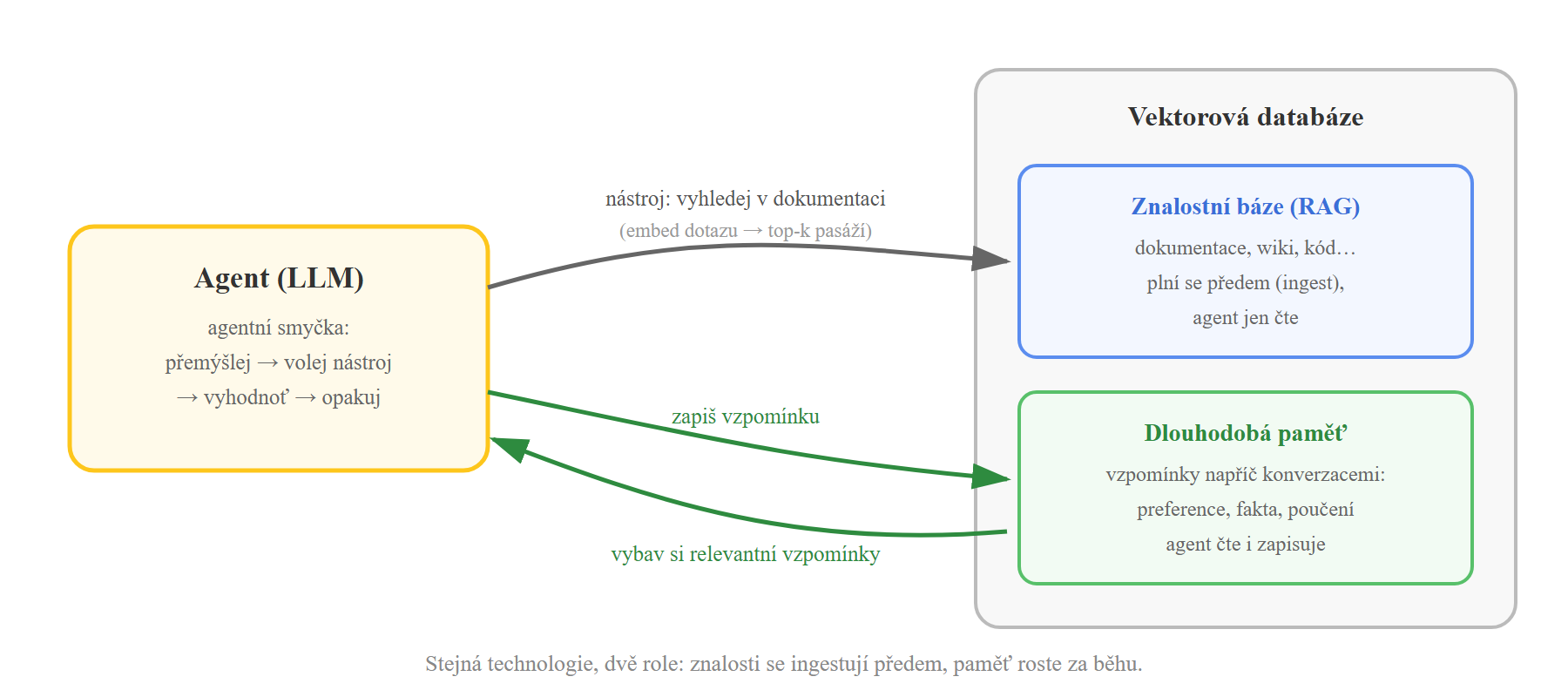
In the article on AI agents we covered the agent loop: the model thinks, calls tools and evaluates results. A vector database plays two distinct roles in it — and it pays not to confuse them.
Role 1: knowledge base (RAG as a tool)
Retrieval-Augmented Generation means: before the model answers, it receives in its context relevant passages found in the vector database. With agents, RAG typically takes the form of a tool — the agent itself decides when and what to ask about, and may well search repeatedly with a reformulated query:
from langchain.agents import create_agent
from langchain.tools import tool
from langchain_openai import OpenAIEmbeddings
from langchain_qdrant import QdrantVectorStore

vectorstore = QdrantVectorStore.from_existing_collection(
    collection_name="wiki",
    embedding=OpenAIEmbeddings(model="text-embedding-3-small"),
    url="http://localhost:6333",
)

@tool
def vyhledej_v_dokumentaci(dotaz: str) -> str:
    """Najde pasaze z firemni dokumentace relevantni k dotazu."""
    dokumenty = vectorstore.similarity_search(dotaz, k=4)
    return "\n\n".join(d.page_content for d in dokumenty)

# agent dostane nastroj a sam rozhoduje, kdy ho pouzit
agent = create_agent(model="openai:gpt-4.1", tools=[vyhledej_v_dokumentaci])
Here it’s worth recalling the U-curve: don’t insert the retrieved passages into the prompt in the order they arrived. The most relevant belong at the beginning and end of the context, because the model overlooks the middle. And because the model answers from the supplied passages instead of from its own “memory of weights”, RAG is also the most effective prevention of hallucinations.
Role 2: the agent’s long-term memory
The context window is working memory: it disappears when the conversation ends. For an agent to remember across sessions (“the user prefers concise answers”, “we’ve already solved deployment via GitLab CI three times like this”), it needs to store memories somewhere — and recall the relevant ones in the next conversation. You don’t know the exact keys in advance, so memories are searched semantically: exactly a task for a vector database.
In practice three kinds of memory have become established (terminology from cognitive psychology, used by both LangChain and the Letta framework, formerly MemGPT):
- Semantic — facts: “the customer uses PostgreSQL 16 and Azure”.
- Episodic — experiences: “migration via pg_dump failed for them last time on extensions”.
- Procedural — learned procedures and rules of behaviour, often distilled into the system prompt.
Writing to memory can be a tool the agent calls itself (“remember this”) or a background process that extracts what’s worth storing after the conversation. This is what agent memory looks like in LangGraph — a store with a semantic index, over which the agent gets tools for both writing and recall:
from langgraph.store.postgres import PostgresStore
from langmem import create_manage_memory_tool, create_search_memory_tool

# store s vektorovym indexem - vzpominky se automaticky embeduji
store = PostgresStore.from_conn_string(
    "postgresql://localhost/agent",
    index={"dims": 1536, "embed": "openai:text-embedding-3-small"},
)

agent = create_agent(
    model="openai:gpt-4.1",
    tools=[
        vyhledej_v_dokumentaci,                                # RAG nad znalostmi
        create_manage_memory_tool(namespace=("vzpominky",)),   # zapis/uprava pameti
        create_search_memory_tool(namespace=("vzpominky",)),   # semanticke vybaveni
    ],
    store=store,
)

# pozdeji, klidne v jine konverzaci:
vzpominky = store.search(("vzpominky",), query="preference uzivatele ohledne odpovedi")
It’s worth noting that this example runs over plain Postgres with pgvector — another illustration that a “vector database” today is more a capability than necessarily a separate product.
Pitfalls you’ll hit in practice
- Chunking decides everything. Documents are split into pieces (chunks) before storage — too small lose context, too large dilute meaning and take up the context window. Start at 500–1000 tokens with overlap and split by document structure (headings, paragraphs), not by characters.
- The embedding model can’t be swapped on the fly. Vectors from different models live in incompatible spaces; changing the model means reindexing everything. The choice is also influenced by language support — reach for a multilingual model (bge-m3, text-embedding-3) and verify its quality on the MTEB leaderboard.
- Stale memory is worse than none. Memories and documents age: policies change, user preferences too. Store timestamps, delete and consolidate — otherwise the agent confidently recalls last year’s truth. (Recap: confident untruth is exactly the mechanism of a hallucination, just this time home-made.) A systematic solution to this problem is offered by temporal graph memories, which we cover in the follow-up article.
- Semantics is not precision. For order numbers, SKU codes and names, embeddings aren’t enough — hence hybrid search with BM25. And evaluate retrieval results regularly (recall on a set of test questions), not just “it looks good”.
What to do about it in practice
- Prototype: Chroma or numpy, no infrastructure. Production with Postgres: pgvector. Scale or heavy filtering: Qdrant. Billions of vectors: Milvus. Don’t want to run anything: Pinecone.
- Give the agent RAG as a tool, not as a hard-wired preceding step — the agent can ask follow-ups and reformulate the query.
- Structure the memory (namespace per user/project, memory type, timestamp) and plan for deletion and consolidation from the start.
- Measure retrieval separately — most “hallucinations of RAG systems” are in fact retrieval errors, not generation errors.
Want to build an agent with memory?
In the AI Agent Developer course we build agents with tools, RAG and long-term memory in practice. Working with data, Python and the basics of AI (including embeddings) is also covered by Data Analysis and Artificial Intelligence. And if you want to run embeddings on your own hardware, try our GPU Lab.
Sources and further reading
- Malkov, Yashunin: Efficient and robust approximate nearest neighbor search using HNSW graphs — the original HNSW paper
- LangChain: Long-term memory — agent memory over the LangGraph store
- LangMem — tools for managing and recalling memories
- Qdrant documentation and pgvector — official documentation
- Vector Databases in Production 2026 and 100M Vector Benchmark — production comparisons
- MTEB leaderboard — comparison of embedding model quality
